SuperVisor
Operator Communications
Console
model 60E
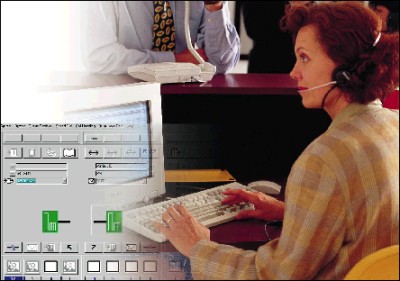
The heart and voice of your company’s telecommunication system is the
telephone operator. Connecting callers, handling messages, locating staff,
dialling destinations, and welcoming visitors at the reception.
To perform all these tasks effortlessly your telephone operator
deserves the best. That is why Philips has an advanced PC based operator
console for the SOPHO iS3000 series ISPBX: the SuperVisor 60E.
The SuperVisor 60E is a multimedia workstation for your telephone
operator.
It has an easy to use, easy to learn graphical user interface, easy to
understand icons, an extensive and flexible name directory and various
messaging facilities. Its multi-tasking capabilities enable your telephone
operator to combine call handling with other office applications.
The advantages of a PC operator console are obvious: it offers all
the possibilities one can expect from a PC workstation, such as large
memory capacity for name directories, colour screen, typewriter keyboard,
integration with office automation systems, and many more....
Software applications for the PBX environment are going through a
turbulent phase of change. Graphical user interfaces and integration with
office automation systems, such as directory systems, are now a
pre-requisite for success. The SuperVisor 60E is Philips’ answer to the
growing demand for open systems. Its Windows based multi-tasking
capabilities offer all benefits to the operator and to the communication
manager.
User aspects
Most operator consoles available on the market today, have a user
interface that reflects the technical (im)possibilities of the PBX without
offering solutions for the telephone operator’s daily tasks. But operators
have to work with the console all day and every day, often only after a
short learning period. They certainly do not wish to use technically
complex displays, nor should they need to acquire special knowledge of
operating systems.
The SuperVisor 60E is different in this respect. Although it is a fully
Windows-based product, its user interface does not require dedicated
Windows skills to perform normal operator tasks. It is a continuation and
enhancement on the successful user interfaces of the SuperVisor 25 and 35.
It uses the full PC screen for call handling, displaying the status of the
calling party and called party with large icons, while access to call
handling functions is via large, clearly marked buttons. The ergonomical
design enables a free choice in using the PC keyboard or mouse.
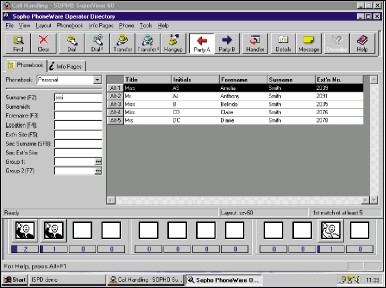
NAME DIRECTORY
The SuperVisor 60E has a large, flexible database for the name
directory and messages. It consists of a large relational database whereby
each entry can contain up to 70 fields. Specific fields have already been
identified, such as name, surname, title, department, the secretary’s
name, surname and telephone number, alternative number, e-mail address.
The layout of the screen can be adjusted to suit the working environment
of the operator. Up to ten fields can be chosen freely as search fields,
while any other combination of fields can be displayed when a match is
found. This can be done independently on any SuperVisor 60E, also when
they are connected in a (LAN) network. The information in the database can
be imported, manipulated, and printed.
MESSAGES
The telephone operator can leave messages for internal users who are
not available when called. When someone is called or dials the
switchboard, the operator can see if any messages were left for that
person. Message(s) can be edited, deleted and printed.
BUSY LAMP FIELD
The SuperVisor 60E is equipped with a Busy Lamp Field. It gives an
overview of the status of a large group of extensions and trunks at
glance, giving the telephone operator even more control over the
communication infrastructure.
Demo mode
The SuperVisor 60E has a demo mode, useful for training and promotional
activities. No connection to the ISPBX is needed here. The demo mode can
simulate almost all call handling situations.
Triple Open platform
The software architecture of the SuperVisor 60E is based on industry
standards, making it
- open to growth: no limitation on the size and growth of the
organization
- open to new technology and standards
- open to applications, such as word processing, e-mail, etc.
ISDN interface to the iS3000
The SuperVisor 60E can be connected to any So extension interface of
the iS3000 series. This gives maximum freedom and flexibility in the
physical location of the operator console, without the need for dedicated
wiring.
Standard ISDN telephone set
An ISDN telephone is delivered with each SuperVisor 60E. It is
connected to the same So bus as the SuperVisor 60E providing the speech
channel. This set offers a variety of features such as volume control,
loudspeaking, microphone mute and headset control.
On-line help
The SuperVisor 60E is equipped with a complete set of documentation as
‘help’ information on individual topics and step-by- step information on
common tasks.
Technical Data
GENERAL FEATURES
- Windows 95 / NT application
- 32 bits technology
- Call handling module
- Directory handling module
- Directory management module
- Busy Lamp field
- Open database (ODBC)
- Optional SQL server
- Multi lingual
- Diagnostic features
CALL HANDLING
Display of:
- incoming call events
- name and (ISDN) number of party A
- call status of party A
- name and (ISDN) number of party B
- call status of party B
- queue length information
- message waiting
- system alarm status
- data and time
- on-line help
Buttons for:
- call answer from queues
- connect parties
- delete parties
- put parties on hold
- direct station select
- last dialed numbers
- break-in
- listen-in
- urgent mark
- individual monitoring
- series calls
- tax metering calls
- directory access
- message access
BUSY LAMP FIELD
The Busy Lamp field shows the extension status (free, ringing, busy,
not available) and trunk status (free, busy, not available):
- up to 600 objects total
- up to 100 objects per page
- 10 objects per line
DIRECTORY HANDLING
- Relational Database Management System (RDBMS)
- Supports Structural Query Language (SQL) and Open Database
Connectivity (ODBC)
- TCP/IP support
- Master/slave, file-sharing or client/server configuration
- Local database option for individual back-up
- Up to 70 entries per name:
- default fields
- user definable field
- hierarchical fields
- yes/no fields
- Free choice of up to 10 search fields
- Free choice of display fields
- Information page
- Message lines
- User definable screen layout
DIRECTORY MANAGEMENT
- Separate directory management application
- Easy to use
- Local or LAN access to database with TCP/IP
- User definable screen layout
DIRECTORY UPDATES
The directory database can be updated:
- manually, using directory management application
- automatically from other SuperVisor 60E’s
- automatically from the central database in SysManager
- automatically from the directory server
- automatically from SOPHO System-Manager V.24 COM port
MESSAGE HANDLING
Per DNR, messages can be entered:
- up to 66 characters per name
- message waiting indication when called
LANGUAGE VERSIONS
The following languages can be selected (menu driven): English, German,
Dutch, French, Spanish, Italian, Portuguese, Swedish, Danish.
HARDWARE REQUIREMENTS
Recommended PC hardware:
- Pentium CPU, 133 MHz
- 32 Mbytes RAM - 800 Mbytes hard disk
- CD-ROM drive
- S-VGA monitor
- standard PC keyboard, country independent
- mouse support
- Windows-95 or NT-Workstation
- one free PC slot
- one V.24 COM port
INTERFACES
- to SOPHO iS3000 series through ISDN card to So bus. Maximum distance
800 meters (up to 2500 meters with U interface plus terminal adapter)
- LAN card for directory distribution / sharing to SysManager,
VoiceManager 300, SQL server and other SV60Es
- V.24 COM port for directory distribution from SOPHO SystemManager
- V.24 COM port for control of voice logging equipment
COMPATIBILITY
The SuperVisor 60E is compatible with SOPHO iS3000 series using SSW
740, SSW 741, SSW 800 and SSW 805 software releases.
As off 12/12/2001
|